Thought bubbles
Item menus are common in games. By menu, I mean a a separate game window that lists options like stats, items and quests. But if there’s no need for stats or a quest list, an item menu can also be avoided. Also, when using an item on an object, an item menu would block the game screen, so the item has to be equipped somehow before used.
This idea avoids item menus. Pressing an item hotkey opens a thought bubble with an item. The player can then select items in the thought bubble and do the same thing as with an item menu.
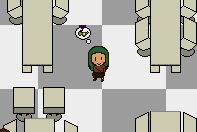
Whenever the player gets close enough to an interactable object, an action thought bubble appears (the nearest object is selected), so the player knows when it is possible to interact.
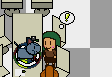
But if the player then opens the items thought bubble, the usual interaction is replaced with an item interacting on the object. Both thought bubbles are opened to show this.
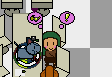
Hopefully that makes it clear what the item is used on. But there are some downsides. The bubbles are a bit small for comfort and might blend into the background.